
How to Monitor Search Engine Rankings: A Practical Guide to SEO Rank Monitoring
Your search rankings tell you whether your SEO efforts are gaining or losing visibility.
The easiest way to monitor search engine rankings is to combine Google Search Console with an SEO rank monitor, also called a rank tracker. Search Console shows how your website actually performs in Google Search, while a rank monitor lets you follow specific keywords, locations, devices, competitors, and ranking changes over time.
Here is the practical process:
- Choose the keywords you want to track.
- Assign each keyword to the page you want to rank.
- Track rankings by location and device where relevant.
- Monitor changes weekly or daily for important keywords.
- Compare rankings with traffic, impressions, CTR, and conversions.
- Investigate significant ranking drops.
- Improve the page and monitor the result.
H2: What Is Search Engine Rank Monitoring?
Search engine rank monitoring is the process of regularly checking where your pages appear in search results for the keywords you target, then tracking how those positions change over time. It shows which pages are gaining visibility, which are slipping, and which are close enough to page one to be worth improving.
Ranking monitoring is one part of a wider measurement picture. The terms below are often used interchangeably, but they cover different scopes:
H3: Rank Monitoring vs. SEO Tracking vs. SEO Monitoring
| Term | What it covers | Typical metrics |
|---|---|---|
| Rank monitoring | Where your pages rank for specific keywords | Position, ranking URL, movement, SERP features |
| SEO tracking | How search performance turns into results | Rankings, impressions, clicks, CTR, organic traffic, conversions |
| SEO monitoring | The overall health of your site in search | All of the above, plus indexation, crawl errors, Core Web Vitals, and backlinks |
This guide focuses on rank monitoring, then shows how to connect rankings to the wider SEO tracking metrics that reveal business impact.
Why Should You Monitor Search Engine Rankings?
Ranking position is one of the easiest SEO metrics to track, but its real value comes from identifying what needs to be done next.
Monitoring rankings helps you:
- identify keywords moving toward page one
- find pages losing organic visibility
- discover content that needs updating
- compare your rankings with competitors
- measure the impact of SEO changes
- identify new keyword opportunities
- find pages with high impressions but low CTR
- prioritize SEO work
For example, a page ranking at position 11 may be a better optimization opportunity than a page ranking at position 60.
The position-11 page is already close to page one. Improving its content, internal links, search intent alignment, or CTR could potentially move it into the top 10.
For a broader approach to evaluating SEO performance, see TechGranduer’s SEO strategy evaluation guide.
How to Monitor Search Engine Rankings
There are three practical ways to monitor rankings.
1. Use Google Search Console
Google Search Console is free and should be part of almost every SEO workflow.
Open:
Google Search Console → Performance → Search results
You can monitor:
- clicks
- impressions
- CTR
- average position
- queries
- pages
- countries
- devices
- search appearance
Google’s Performance report allows you to analyze your search performance by query, page, country, device, and search appearance. Google Search Console Performance Report
For example:
| Query | Impressions | CTR | Average Position |
|---|---|---|---|
| SEO rank tracking | 2,400 | 4.1% | 7.8 |
| keyword rank tracking | 1,900 | 3.6% | 9.4 |
| monitor Google rankings | 850 | 5.2% | 6.1 |
This data can reveal opportunities that a simple ranking number won’t.
For example:
High impressions + low CTR
→ Review the page title and search snippet.
Average position 8 + low clicks
→ Investigate SERP features and search intent.
Position improving + impressions increasing
→ The page may be gaining meaningful search visibility.
Google also recommends using Search Console alongside Google Analytics to understand both search performance and what users do after arriving on your website. Google Search Console and Analytics
2. Use SEO Rank Monitor
Google Search Console is useful, but it isn’t designed to replace a dedicated SEO rank monitor. Search Console reports an average position across many searches; a rank monitor checks search results for your chosen keywords on a fixed schedule, from a set location and device.
An SEO ranking monitor can track:
- specific target keywords
- daily or weekly ranking changes
- desktop vs. mobile rankings
- countries and cities
- competitors
- SERP features
- historical ranking data
- ranking distribution
Tools such as Ahrefs, Semrush, SE Ranking, Moz, and Ubersuggest provide different combinations of these features.
Semrush’s Position Tracking tool, for example, supports tracking keywords across locations and devices and comparing performance against competitors. Semrush Position Tracking
Ahrefs also provides dedicated rank tracking for monitoring keyword positions across locations and devices. Ahrefs Rank Tracker
3. Check Rankings by Location and Device
Don’t assume that one ranking represents everyone.
A website can rank differently depending on:
- country
- city
- device
- language
- search context
For example:
| Keyword | Desktop | Mobile |
|---|---|---|
| SEO agency Dubai | #6 | #9 |
| SEO consultant Dubai | #4 | #7 |
For local SEO, tracking the location where your customers actually search is particularly important.
Google also explains that search results can vary depending on context, which is one reason manually searching your own keywords isn’t a reliable substitute for structured rank tracking. Google Search Console Performance Report
What Keywords Should You Track?
Don’t track every keyword your website ranks for.
Track the keywords that matter to your business.
Primary keywords
These are the main keywords targeted by important pages.
Examples:
- SEO services
- technical SEO services
- B2B SEO
- SaaS SEO
- SEO strategy
Commercial keywords
These have stronger buying intent:
- SEO agency for SaaS
- B2B SEO agency
- technical SEO agency
- enterprise SEO services
Informational keywords
These can attract users earlier in the buying journey:
- how does SEO work
- how to improve Google rankings
- how to monitor search engine rankings
- what is technical SEO
Long-tail keywords
Long-tail keywords are more specific searches.
For example:
SEO agency
versus:
SEO agency for B2B SaaS companies
The second query is more specific and may have clearer intent.
Branded keywords
Track:
- company name
- product names
- brand variations
- branded services
Local keywords
If you target specific markets, track location-based keywords separately.
Examples:
- SEO agency Dubai
- SEO company UAE
- SEO consultant London
How Often Should You Check Your Rankings?
You don’t need to check every keyword every hour.
Daily
Daily monitoring makes sense for:
- highly competitive keywords
- important commercial terms
- major websites
- website migrations
- significant SEO changes
Weekly
Weekly monitoring is sufficient for many SEO campaigns.
It gives you enough data to identify trends without reacting to every small fluctuation.
Monthly
Use monthly analysis for strategic decisions.
Compare:
- rankings
- organic traffic
- impressions
- CTR
- conversions
- competitors
- SERP visibility
The important thing is to compare trends, not isolated ranking movements.
What SEO Metrics Should You Monitor?
Ranking position is only one part of SEO performance. Effective SEO tracking connects positions to the visibility, traffic, and conversions they produce.
Keyword position
Shows where your page appears for a tracked query.
Impressions
Shows how often your page appeared in Google Search.
Clicks
Shows how many users visited your site from search results.
CTR
Click-through rate tells you how often users clicked your result after seeing it.
A page can rank well and still receive fewer clicks than expected.
Organic traffic
Use Google Analytics or another analytics platform to see how much traffic comes from organic search.
Conversions
Track the outcomes that matter to the business:
- leads
- enquiries
- purchases
- registrations
- demos
- subscriptions
- revenue
SERP features
Monitor whether the search results contain:
- Featured Snippets
- People Also Ask
- local results
- image results
- video results
- sitelinks
- other enhanced search features
Google documents the different search appearances that can affect how results are presented. Google Search Appearance
Core Web Vitals
Core Web Vitals sit on the SEO monitoring side rather than rank tracking. They won’t tell you where you rank, but poor scores can hold back pages that are otherwise competitive. For technical SEO, monitor:
- LCP: loading performance
- INP: responsiveness
- CLS: visual stability
Google’s current Core Web Vitals guidance defines good thresholds of LCP ≤ 2.5 seconds, INP ≤ 200 milliseconds, and CLS ≤ 0.1 at the 75th percentile. Google Web Vitals
For a wider look at the tools used to analyze SEO performance, see TechGranduer’s B2B SEO tools guide.
How to Analyze Keyword Ranking Changes
The ranking number itself isn’t enough.
Look at what changed and why.
Position 18 → Position 11
This is progress, but the page is still outside the top 10.
Action: Review search intent, content depth, internal links, competing pages, and authority.
Position 11 → Position 7
This is a stronger opportunity.
Action: Analyze the current top-ranking pages and optimize the page for CTR, relevance, and completeness.
Position 7 → Position 15
Investigate the decline.
Check:
- competitor changes
- content changes
- backlinks
- search intent
- technical issues
- SERP changes
Impressions increase but clicks decrease
Check your CTR.
Your page may be appearing for more searches but failing to attract clicks.
Action: Review the title, meta description, search intent, and SERP features.
Rankings increase but conversions decrease
Higher rankings don’t necessarily mean better business results.
Check whether the new keywords are actually relevant to your target customers.
SEO Rank Tracking Example
The following dashboard shows how a typical rank-tracking report might be structured.
The numbers are illustrative and are not TechGranduer’s actual SEO performance data.
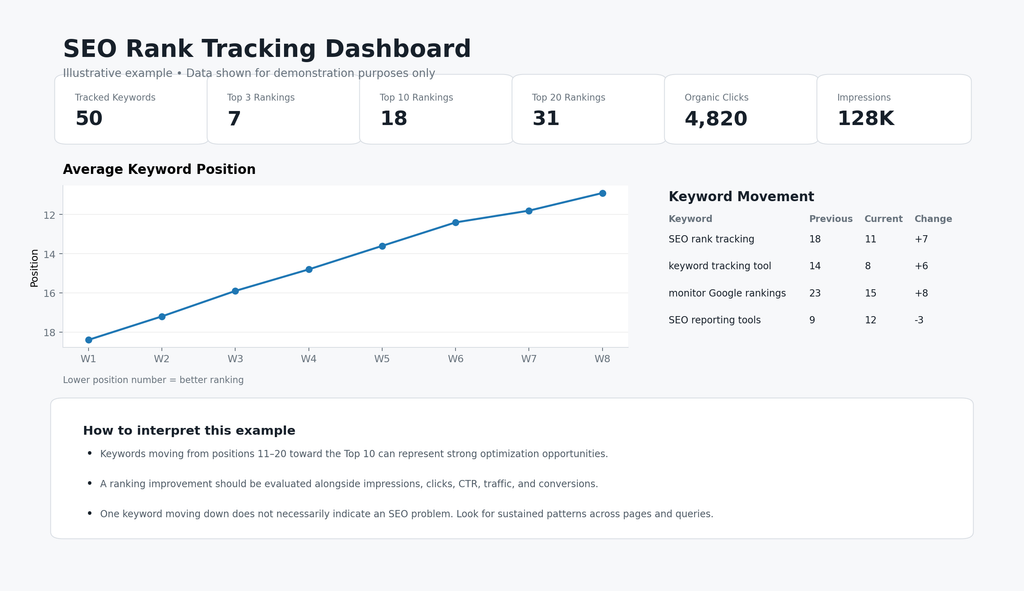
Illustrative SEO rank-tracking dashboard showing keyword movement, ranking distribution, clicks, impressions, and average position. Data shown for demonstration purposes only.
The useful part of a dashboard isn’t the number of charts.
It’s identifying which numbers require action.
For example:
| Situation | What to investigate |
|---|---|
| Position 11 → 7 | Content, CTR, internal links |
| Position 7 → 15 | Competitors, intent, content changes |
| Impressions ↑, clicks ↓ | CTR and SERP features |
| Rankings ↓, impressions ↓ | Content, technical SEO, search demand |
| Rankings ↑, conversions ↓ | Keyword intent |
| Competitor overtakes your page | Their content, links, SERP coverage |
What to Do When Your Rankings Drop
Don’t immediately rewrite the page.
Follow a diagnostic process.
1. Confirm the decline
Determine whether the drop affects:
- one keyword
- multiple keywords
- one page
- an entire topic
- the entire website
2. Check Google Search Console
Compare:
- clicks
- impressions
- CTR
- average position
- queries
- pages
- countries
- devices
3. Check the SERP
Search the affected keyword and look at the current results.
Ask:
- Who replaced you?
- What type of content ranks?
- Has search intent changed?
- Are videos appearing?
- Is there a Featured Snippet?
- Are competitors covering topics you missed?
4. Check technical SEO
Review:
- indexation
- robots.txt
- canonical tags
- redirects
- broken links
- server errors
- page speed
- mobile experience
Google provides technical guidance for making websites accessible to search engines. Google Search Technical Requirements
5. Review the content
Compare your page with the pages currently ranking.
Look for:
- outdated information
- missing sections
- weak examples
- unanswered questions
- poor search-intent alignment
- lack of original information
Google’s guidance emphasizes helpful, reliable, people-first content. Google Search Essentials
6. Check internal links and backlinks
Look for:
- relevant internal links
- lost backlinks
- new competitor backlinks
- weak supporting content
- missing topical connections
Then make the necessary changes and continue monitoring the page.
Best Tools to Monitor Search Engine Rankings
| Tool | Best for |
|---|---|
| Google Search Console | Google Search performance |
| Ahrefs | SEO research, backlinks and rank tracking |
| Semrush | Rank tracking and competitor analysis |
| SE Ranking | Dedicated rank tracking |
| Moz Pro | SEO and rank monitoring |
| Ubersuggest | Keyword research and SEO monitoring |
Google Search Console
Best starting point because it provides first-party Google Search data.
Ahrefs
Useful when you need ranking data alongside keyword research, backlink analysis, and competitor research.
Semrush
Useful for keyword position tracking, competitor comparison, location tracking, and broader SEO research.
SE Ranking
Useful when rank tracking is a central part of an SEO workflow.
Moz Pro
Combines rank tracking with broader SEO analysis.
Ubersuggest
Useful for keyword research, SEO analysis, and accessible rank monitoring.
How to Choose an SEO Rank Monitor
The best tool depends on the size of your website, number of keywords, locations, competitors, and reporting requirements. Before committing, check:
- Update frequency: daily, weekly, or on-demand ranking checks
- Location depth: country-level only, or city and local tracking
- Device split: separate desktop and mobile rankings
- SERP feature tracking: whether it shows Featured Snippets, People Also Ask, and AI-generated results for your keywords
- Competitor limits: how many competitors you can track per project
- Alerts: notifications when important keywords drop
- Reporting: scheduled or shareable reports for clients or leadership
- Pricing model: per keyword, per project, or per check, since costs grow with your keyword list
If you only need to monitor search engine rankings for a small site, Google Search Console plus a lower-cost tracker is often enough. Larger sites tracking many keywords, locations, and competitors usually need a full SEO platform.
How to Improve Your Search Engine Rankings
Once ranking data identifies an opportunity, focus on the page itself.
Improve search intent
Make sure the page answers what the searcher actually wants.
Improve content
Add useful:
- examples
- data
- explanations
- screenshots
- comparisons
- original insights
Don’t add words simply to make the article longer.
Improve internal linking
Link relevant pages together so users and search engines can discover related content.
TechGranduer’s digital growth strategy guide provides broader context around how SEO fits into digital growth.
Improve titles and CTR
If impressions are high but clicks are low, test a more relevant and compelling title.
Improve technical SEO
Make sure important pages can be crawled, indexed, rendered, and accessed efficiently.
Build relevant authority
Earn links and mentions from relevant websites by publishing content worth referencing.
Avoid tactics designed solely to manipulate rankings. Google provides guidance on spam policies and prohibited practices. Google Search Spam Policies
Track the result
After making meaningful changes:
Optimize → Monitor → Compare → Improve
That is the practical SEO feedback loop.
Can’t Read Everything Above? Scan This
To monitor search engine rankings effectively, use Google Search Console for actual Google Search performance and a dedicated SEO rank monitor for controlled keyword tracking.
Focus on:
- target keyword positions
- ranking changes
- impressions
- clicks
- CTR
- organic traffic
- conversions
- competitors
- SERP features
- location
- device
Most importantly, don’t treat rankings as numbers to collect.
Use them to identify opportunities:
Position 11? Optimize it.
CTR falling? Improve the SERP snippet.
Competitor overtaking you? Analyze their page.
Traffic increasing but conversions falling? Recheck keyword intent.
Rankings dropping across multiple pages? Investigate before changing everything.
That is how rank tracking becomes useful: measure what changed, understand why, and take the next SEO action based on the data.
Frequently Asked Questions About Search Engine Rankings
How do I check my search engine rankings?
Use Google Search Console to see your website’s actual Google Search performance. For specific keyword tracking, use a dedicated rank tracker such as Ahrefs, Semrush, SE Ranking, Moz, or Ubersuggest.
What is the best tool to monitor keyword rankings?
Google Search Console is the best free starting point. For dedicated keyword tracking, Ahrefs, Semrush, SE Ranking, Moz, and Ubersuggest are popular options. The right choice depends on your keyword volume, locations, competitors, and reporting requirements.
What is an SEO ranking monitor?
An SEO ranking monitor is a tool that automatically checks where your pages rank for chosen keywords, locations, and devices, and records how those positions change over time. Unlike manual searches, it checks from a neutral, consistent setting, so results aren’t affected by your own search history.
What is the difference between SEO monitoring and SEO tracking?
SEO tracking measures search performance, such as rankings, clicks, organic traffic, and conversions. SEO monitoring is broader. It also watches site health, including indexation, crawl errors, Core Web Vitals, and backlinks, so you can catch problems before they affect rankings.
How often should I check my Google rankings?
Weekly monitoring is sufficient for many SEO campaigns. Check important commercial keywords more frequently if necessary, and use monthly analysis to make broader SEO decisions.
Can I monitor Google rankings for free?
Yes. Google Search Console is free and provides clicks, impressions, CTR, queries, pages, and average position. Dedicated rank trackers provide additional features such as controlled keyword tracking, competitor monitoring, location tracking, and ranking history.
Why do search engine rankings change?
Rankings can change because of competitor activity, content changes, backlinks, technical issues, changes in search intent, SERP features, search demand, and Google’s ranking systems.
Why is my website ranking differently in different locations?
Google results can vary by location and device. A website may rank well in one city or country and lower somewhere else. Location-specific tracking is therefore important for local and international SEO.
Is Google Search Console’s average position the same as my actual ranking?
No.
Search Console reports an average position, not one fixed ranking. Google explains that the metric is based on the topmost result from your site when it appears in Search. Google Search Console Performance Report
Should I track rankings on mobile and desktop?
Yes. If your audience uses both, tracking both devices can reveal meaningful differences in visibility.